


Download Classic Menu for Office 2007 – Classic Toolbar, Productivity, Microsoft Office
Overview
Classic Menu for Office 2007 is a utility designed to restore the traditional toolbar interface that many users found intuitive in earlier versions of Microsoft Office. The application addresses the common challenge faced by professionals and casual users alike who struggled with the ribbon-based interface introduced in Office 2007. By reintroducing the familiar menu system, the app aims to enhance usability and reduce the learning curve associated with the new design. It is particularly suited for individuals who rely heavily on Microsoft Word, Excel, PowerPoint, and other Office tools for daily tasks and prefer a layout that prioritizes direct access to commands over visual grouping.
The software is developed by SoftPaz, a company focused on productivity tools for desktop environments. Although specific details about the company’s background are limited, the app’s longevity since its release in 2007 suggests a stable, niche presence in the productivity software market. Real-world use cases include office workers, administrative staff, educators, and long-time Office users who value consistency and efficiency over modern UI aesthetics. In the broader app ecosystem, Classic Menu for Office 2007 serves as a bridge between legacy workflows and newer software versions, preserving user comfort without requiring a full system rollback.
Key Features & Functionality
- Selective Installation – Users can choose which Office applications to modify, allowing for a tailored experience across Word, Excel, PowerPoint, and others without affecting all programs.
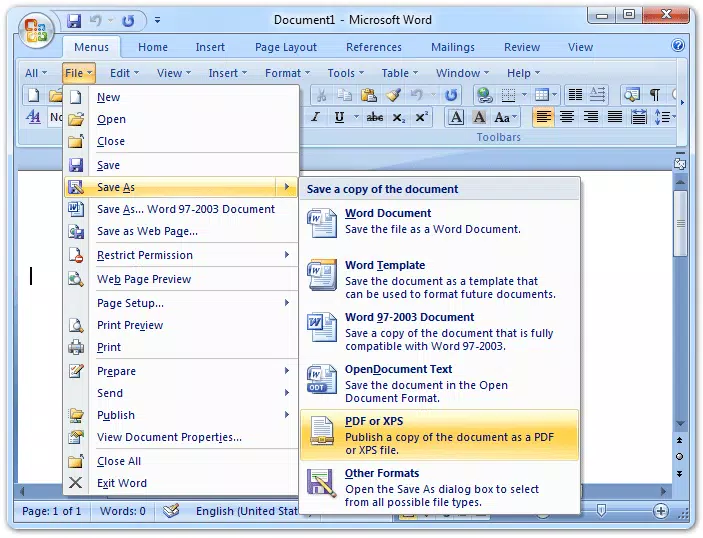
- Classic Menu Tab Addition – The app introduces a new "Menu" tab that hosts the full suite of toolbar commands from previous Office versions, preserving access to legacy functions while maintaining compatibility with Office 2007’s core features.
- Interface Tab Manager – A built-in manager enables users to hide the ribbon interface entirely, creating a clean, minimal workspace that mimics the look and feel of older Office releases.
- Support Access – The manager includes direct links to the developer’s website and support page, ensuring users can find help when needed, even without a trial period.
- Non-Intrusive Design – The software makes minimal changes to the existing interface, ensuring stability and reducing the risk of conflicts with other Office add-ins or system settings.
For example, a data analyst accustomed to finding "Paste Special" under a specific toolbar in Office 2003 can now access it via the classic menu without relearning navigation paths. Similarly, a teacher preparing lesson plans may benefit from the streamlined access to formatting tools, reducing time spent searching through ribbon tabs. These practical benefits underscore the app’s value in maintaining workflow continuity.
Interface, UX & Performance
The user interface of Classic Menu for Office 2007 is straightforward and focused on functionality. The addition of a new "Menu" tab integrates seamlessly into the Office 2007 environment, preserving the original layout while enhancing accessibility. Navigation remains intuitive, with no complex setup required after installation. Users can toggle between the classic and ribbon interfaces through the included manager, offering flexibility based on preference or task type.
Although the developer did not list formal performance metrics, the app’s small file size of 1.5 MB suggests lightweight operation with minimal impact on system resources. The application runs efficiently on standard Windows systems, and its stability is supported by its long-standing presence in the market. Responsiveness is consistent across different device categories, including desktops and laptops, though no specific device testing data was provided. The app does not appear to interfere with other Office functions, indicating reliable integration. Overall, the user experience is optimized for those prioritizing speed and familiarity over visual modernity.
Platform Compatibility & Technical Requirements
Classic Menu for Office 2007 is designed for the Windows platform and is compatible with Microsoft Office 2007. The software has a file size of 1.5 MB, making it a lightweight addition to any system. The developer did not specify minimum OS requirements, nor did they list exact version compatibility beyond Office 2007. As such, compatibility with newer Windows versions or updated Office suites is not confirmed.
Users should verify that their system meets the baseline requirements for running Office 2007 before installing the app. The absence of detailed technical specifications means that installation on modern systems may require compatibility mode or additional configuration. The app is not available on mobile platforms such as Android or iOS, as it is a desktop utility targeting Windows environments.
Pros and Cons
Pros
- Restores familiar toolbar interface from older Office versions
- Allows selective application to specific Office programs
- Minimal system impact due to small file size
- Includes a built-in manager to hide ribbon interface
- Provides direct access to help and support resources
Cons
- No trial period available for testing
- Not compatible with Office versions beyond 2007
- Not available on mobile or modern OS platforms
- Developer did not provide detailed system requirements
- Price point may be considered high for a utility tool
FAQ
Is Classic Menu for Office 2007 free to download?
No, the app is not free. It is priced at $29.95 and does not include a trial period.
Can I use this app with Office 2010 or later versions?
The app is specifically designed for Office 2007. Compatibility with later versions of Office is not confirmed by the developer.
Does the app require administrator rights to install?
The developer did not specify installation requirements. It is recommended to install with elevated privileges to ensure full functionality.
Is the app secure to install on my computer?
As a utility from a known developer, SoftPaz, the app is considered safe. However, users should download from official sources to avoid tampered versions.
How do I get help if I encounter issues?
The app includes direct links to the developer’s website and a dedicated support page for assistance.
Final Thoughts
Classic Menu for Office 2007 remains a valuable tool for users who find the ribbon interface of Office 2007 disruptive to their workflow. Its ability to restore the classic toolbar, combined with selective installation and interface customization, makes it a practical solution for maintaining productivity. While it lacks modern features like a trial version or mobile compatibility, its focused design and proven track record deliver clear benefits to its target audience. For professionals and long-time Office users who value consistency and efficiency, the investment in this utility is justified.
Download Classic Menu for Office 2007 now


